## Connect User Wallets
Connect User Wallets—also called BYOP (Bring Your Own Pollen)—lets your users authorize your app to spend their own Pollen on Pollinations requests. Your publishable App Key (`pk_...`) identifies the app; after approval, Pollinations returns a scoped user key (`sk_...`) for API calls.
Users stay in control of their balance, budgets, and revocation; your app never has to pay for their usage.
## 🗝️ App Key
An **App Key** (`pk_...`) is the publishable key your app sends users to Pollinations with. Without one, the consent screen falls back to the redirect hostname and traffic isn't attributed to your account.
To create one, go to [enter.pollinations.ai](https://enter.pollinations.ai/keys) → **Create app key**:
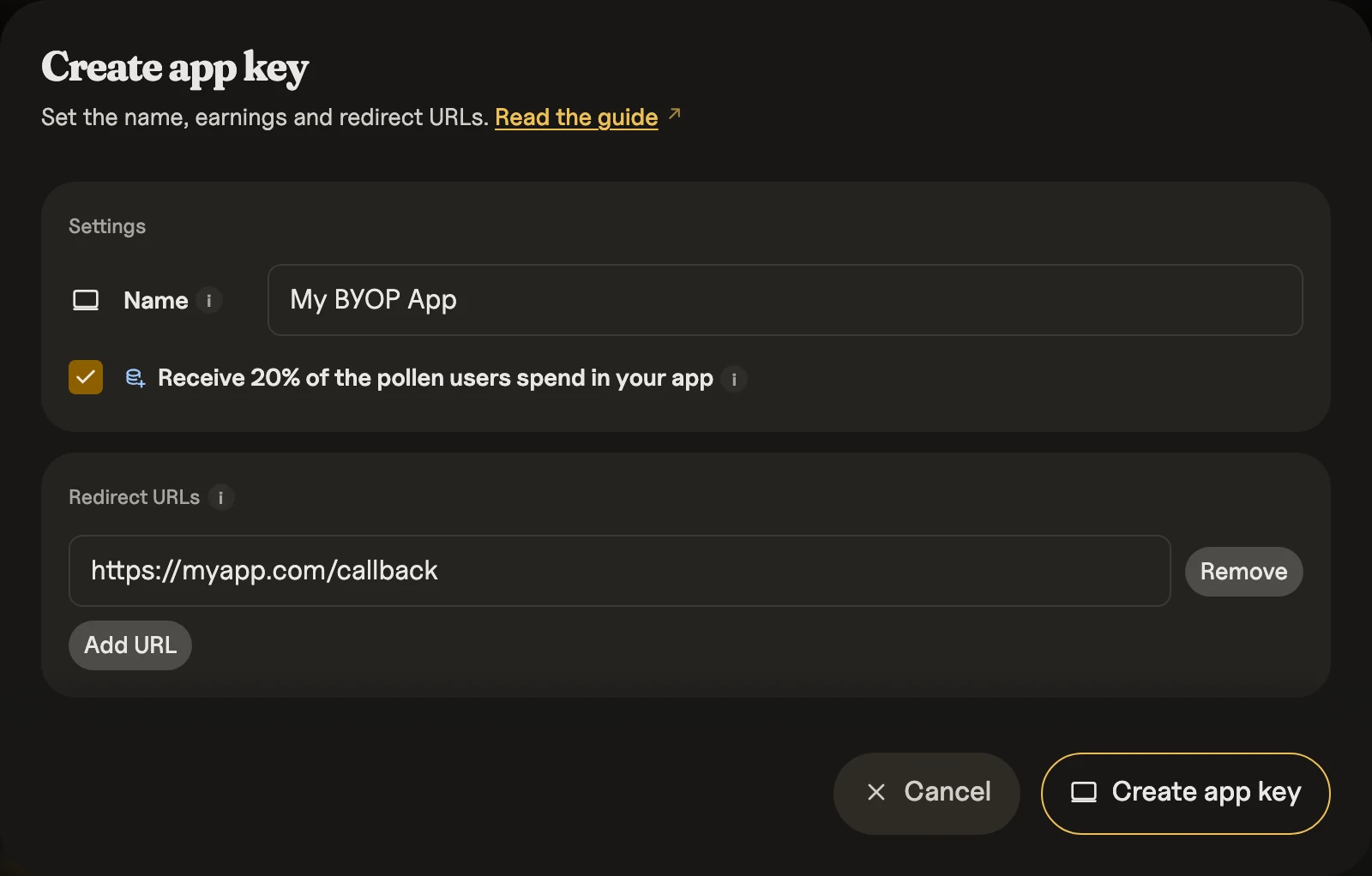
Set the **Name** (shows on the consent screen). For web apps, add at least one **Redirect URI** (your exact callback URL). The key you get back is your `client_id` (a `pk_...` publishable key; the legacy name `app_key` is still accepted).
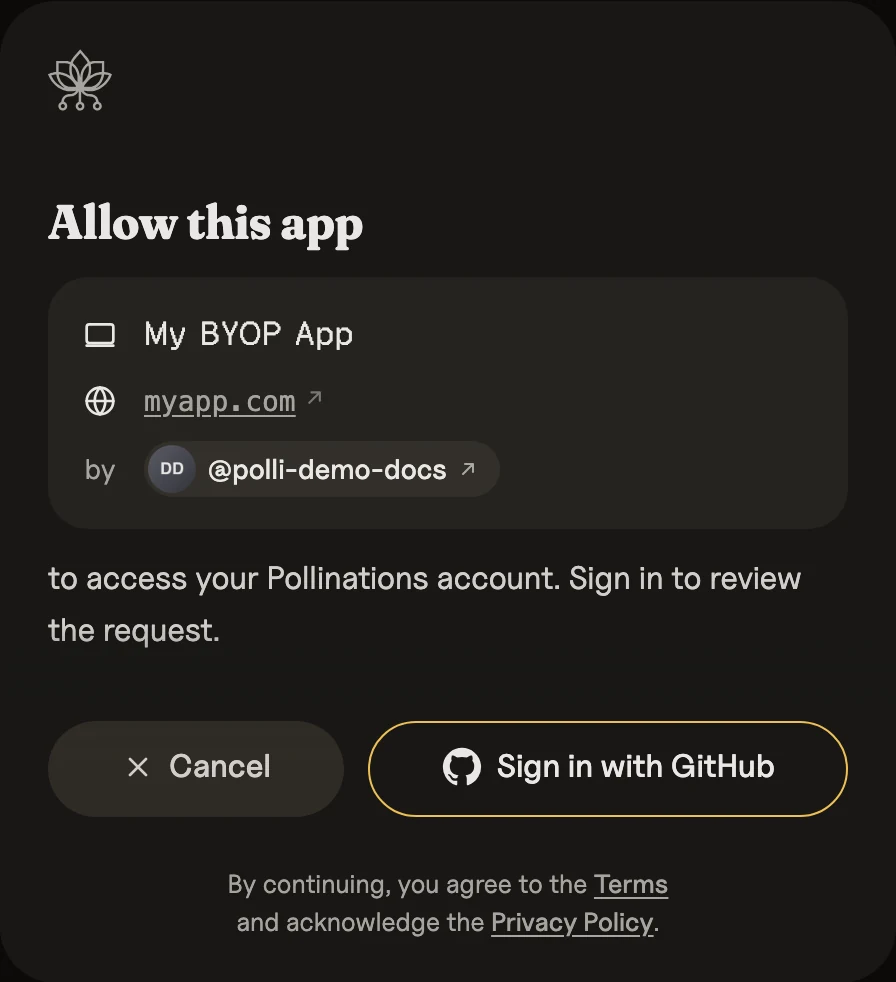
When a user lands on the consent screen signed-out, they're prompted to continue with GitHub:
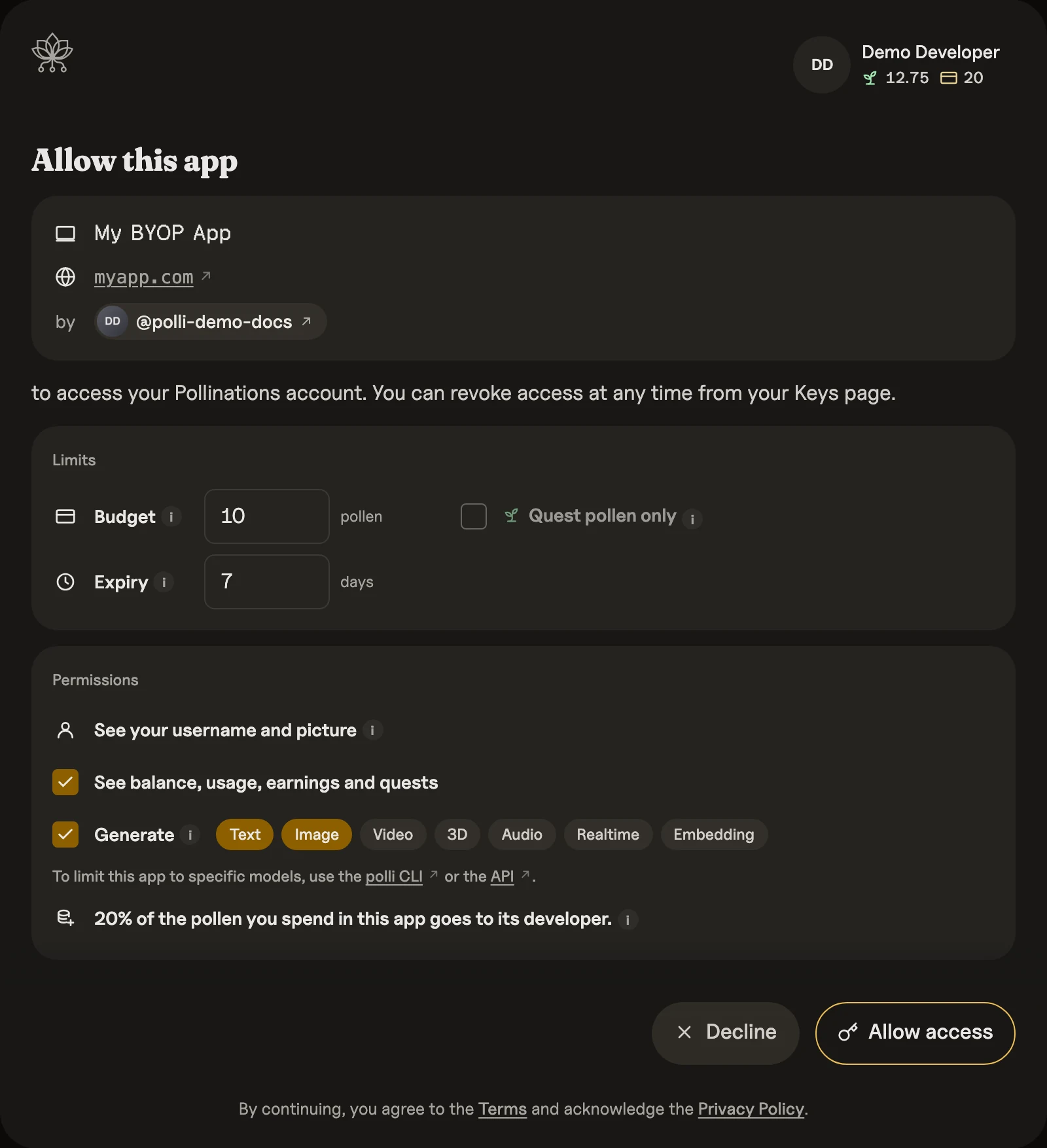
Once signed in, they review the requested access and confirm:
## 🧩 Drop-in Button (No Build Step)
One script tag adds a Connect button that runs the OAuth code flow below for you.
Use one `` per page; additional elements show an error instead of a sign-in button.
```html
```
Add the page URL, without query or fragment, as a Redirect URI on your App Key. Call Pollinations with `connect.apiKey` as in step 3 below.
| Attribute | What it does |
|-----------|-------------|
| `app-key` | Your App Key (required) |
| `budget` | Pollen cap, as `budget` below |
| `expiry` | Key lifetime in days |
| `models` | Comma-separated, as `models` below |
| `permissions` | Comma-separated scopes: `profile`, `usage`, `keys` |
| `hide-buy-pollen` | Hides the top-up menu item; the balance and Disconnect remain available (UI 0.1.0-alpha.20+) |
| `menu-links` | JSON array of `{ "label": "Dashboard", "href": "https://example.com" }` links shown in the signed-in menu; optional `icon`: `app`, `discord`, or `bug`; only HTTP(S) links are accepted (UI 0.1.0-alpha.20+) |
For custom menu links, use UI `0.1.0-alpha.20` or later and single quotes around the JSON attribute:
```html
```
Invalid entries are ignored. Malformed JSON or a non-array value adds no custom links; sign-in still works.
The key stays in `sessionStorage`, so it lasts until the tab closes.
## Developer Earnings
Developer earnings are opt-in per App Key. When enabled, users pay 25% over base rates. The markup credits to your balance.
```text
Base request cost: 1.00 pollen
User pays: 1.25 pollen
You receive: 0.25 pollen
```
Credits land in the same balance type the user paid from: Quest Pollen when the request used Quest Pollen, Paid Pollen when it used Paid Pollen.
Pass `earningsEnabled: true` when creating an App Key via the API, or toggle it later from the dashboard:
```bash
curl -X POST https://gen.pollinations.ai/account/keys \
-H 'Authorization: Bearer sk_yoursecretkey' \
-H 'Content-Type: application/json' \
-d '{"name":"my-app","type":"publishable","redirectUris":["https://myapp.com/callback"],"earningsEnabled":true}'
```
## ⚙️ Web Apps (OAuth Code Flow)
Use the OAuth authorization-code flow with PKCE for new web integrations. It keeps the `sk_...` key out of the browser callback URL and works with standard OAuth clients.
Discovery is available at:
```text
https://enter.pollinations.ai/.well-known/oauth-authorization-server
```
### 1. Build the Auth Link
Generate a fresh PKCE verifier and S256 challenge, then send the user to `/authorize`:
```text
https://enter.pollinations.ai/authorize
?response_type=code
&client_id=pk_yourkey
&redirect_uri=https://myapp.com/callback
&scope=profile%20usage
&state=random-csrf-token
&code_challenge=BASE64URL_SHA256_VERIFIER
&code_challenge_method=S256
```
With restrictions:
```text
https://enter.pollinations.ai/authorize?response_type=code&redirect_uri=https://myapp.com/callback&client_id=pk_yourkey&scope=usage&models=image,text&expiry=7&budget=10&state=random&code_challenge=...&code_challenge_method=S256
```
| Param | What it does | Example |
|-------|-------------|---------|
| `client_id` | Your publishable key — shows app name + author on consent screen, tracks traffic and developer earnings | `pk_abc123` |
| `redirect_uri` | Where users return after authorizing — must exactly match a Redirect URI on the App Key, query string included (loopback `http://localhost` matches any port) | `https://myapp.com/callback` |
| `response_type` | Use `code` for the OAuth authorization-code flow | `code` |
| `state` | Opaque value echoed back on the callback for CSRF protection | `any-random-string` |
| `code_challenge` | Base64url SHA-256 of your PKCE verifier | `abc...` |
| `code_challenge_method` | Must be `S256` | `S256` |
| `scope` | Account access (space or comma separated) | `usage keys` |
| `models` | Models the key can use. A category (`text`, `image`, `video`, `audio`, `3d`, `embedding`, `realtime`) allows every model in it, including models added later; a model ID from `/models` allows only that model. The user can remove entries on the consent screen. | `image,text` or `black-forest-labs/flux.1-schnell,tongyi-mai/z-image-turbo` |
| `budget` | Numeric Pollen cap. Defaults to `5`; users can clear the budget field on the consent screen for unlimited. | `10` |
| `expiry` | User-authorized key lifetime in days (default: 7) | `7` |
Legacy names `app_key`, `redirect_url`, and `permissions` are still accepted for backwards compatibility.
### 2. Handle the Redirect
User comes back with a short-lived code:
```text
https://myapp.com/callback?code=oauth_code&state=random-csrf-token
```
Validate `state`, then exchange the code at the token endpoint. Server-backed apps
call it from their backend; static browser apps can call it directly, because PKCE
replaces the client secret:
```bash
curl -X POST https://enter.pollinations.ai/api/oauth/token \
-H 'Content-Type: application/x-www-form-urlencoded' \
-d 'grant_type=authorization_code' \
-d 'code=oauth_code' \
-d 'client_id=pk_yourkey' \
-d 'redirect_uri=https://myapp.com/callback' \
-d 'code_verifier=YOUR_PKCE_VERIFIER'
# → { "access_token": "sk_...", "token_type": "bearer", "expires_in": 604800, "scope": "profile usage" }
```
The authorization code is single-use and expires after 10 minutes. Token responses use RFC 6749 error objects such as `invalid_grant`, `invalid_request`, and `unsupported_grant_type`.
Scopes: `profile` (name + email), `usage` (account balance + usage), `keys` (account admin — create/list/revoke keys). The response's `scope` echoes what the user actually granted, which may be narrower than requested. Generation needs no scope — spending is bounded by the budget and expiry the user approved. There are no refresh tokens; re-run the flow when the key expires. Issued keys appear in the user's dashboard like any other API key and can be edited or revoked there at any time — revocation is immediate.
**Browser-only apps.** The same request works from `fetch`:
```javascript
const res = await fetch('https://enter.pollinations.ai/api/oauth/token', {
method: 'POST',
headers: { 'Content-Type': 'application/x-www-form-urlencoded' },
body: new URLSearchParams({
grant_type: 'authorization_code',
code, // From the callback URL
client_id: 'pk_yourkey',
redirect_uri: 'https://myapp.com/callback', // Exact registered URI
code_verifier, // The verifier you saved
}),
});
const { access_token } = await res.json();
```
Keep the token in memory, or `sessionStorage` if a callback page must hand it back within the same tab. Never put it in `localStorage`, a URL, analytics, or logs.
### 3. Call Pollinations
Use the returned `access_token` as the API key:
```javascript
fetch('https://gen.pollinations.ai/v1/chat/completions', {
method: 'POST',
headers: { 'Authorization': `Bearer ${access_token}`, 'Content-Type': 'application/json' },
body: JSON.stringify({ model: 'openai/gpt-5.4-nano', messages: [{ role: 'user', content: 'yo' }] })
});
```
Examples: [browser-only](https://github.com/pollinations/pollinations/tree/main/apps/oauth-client-demo) ·
[existing user database](https://github.com/pollinations/pollinations/tree/main/apps/oauth-account-linking-demo)
## ⚙️ Legacy Web Apps (Fragment Flow)
The older BYOP redirect flow is still supported. It returns the user-authorized key directly in the URL fragment and does not use PKCE.
```text
https://enter.pollinations.ai/authorize?redirect_uri=https://myapp.com/callback&client_id=pk_yourkey&scope=usage
```
User comes back with the key in the URL fragment:
```text
https://myapp.com/callback#api_key=sk_abc123xyz
```
Fragment, not query param — never hits server logs. 🔒 If you passed `state`, it's echoed back: `#api_key=sk_...&state=...`. On denial the fragment is `#error=access_denied&state=...`.
### Code
```javascript
// Send user to auth
const params = new URLSearchParams({
redirect_uri: location.href,
client_id: 'pk_yourkey',
});
window.location.href = `https://enter.pollinations.ai/authorize?${params}`;
// Grab key from URL after redirect
const apiKey = new URLSearchParams(location.hash.slice(1)).get('api_key');
// Use their pollen
fetch('https://gen.pollinations.ai/v1/chat/completions', {
method: 'POST',
headers: { 'Authorization': `Bearer ${apiKey}`, 'Content-Type': 'application/json' },
body: JSON.stringify({ model: 'openai/gpt-5.4-nano', messages: [{ role: 'user', content: 'yo' }] })
});
```
## 🖥️ CLIs & Headless Apps (Device Flow)
Same authorize screen, but the user opens a browser separately. Your CLI polls for the key.
Use this for CLIs, bots, extensions, and other apps that cannot show the authorization page themselves.
```bash
# 1. request a device code (pass your app_key as client_id for attribution)
curl -X POST https://enter.pollinations.ai/api/device/code \
-H 'Content-Type: application/json' \
-d '{"client_id": "pk_yourkey"}'
# → { "device_code": "...", "user_code": "ABCD-1234",
# "verification_uri": "https://enter.pollinations.ai/device",
# "verification_uri_complete": "https://enter.pollinations.ai/device?user_code=ABCD-1234",
# "expires_in": 1800, "interval": 5 }
# 2. give the user verification_uri_complete to open directly,
# or show verification_uri and user_code
# 3. poll for the key (every 5s)
curl -X POST https://enter.pollinations.ai/api/device/token \
-H 'Content-Type: application/json' \
-d '{"device_code": "..."}'
# pending → { "error": "authorization_pending" }
# done → { "access_token": "sk_...", "token_type": "bearer" }
```
The same device-code exchange is also available through the standard token endpoint:
```bash
curl -X POST https://enter.pollinations.ai/api/oauth/token \
-H 'Content-Type: application/x-www-form-urlencoded' \
-d 'grant_type=urn:ietf:params:oauth:grant-type:device_code' \
-d 'device_code=...'
```
## 👤 Who's Using This Key?
Once you have the user-authorized `sk_...` key, you can check who it belongs to:
```bash
curl https://enter.pollinations.ai/api/device/userinfo \
-H 'Authorization: Bearer sk_...'
# → { "sub": "user-id", "preferred_username": "voodoohop", "picture": "..." }
# with the `profile` scope, also: "name": "Thomas", "email": "..."
```
`/api/oauth/userinfo` returns the same standard OIDC userinfo shape. `name` and `email` are included only when the key carries the `profile` scope.
---
🕐 User-authorized keys default to 7 days. Users can revoke anytime from the dashboard.
[edit this doc](https://github.com/pollinations/pollinations/edit/main/BRING_YOUR_OWN_POLLEN.md) · *h/t [Puter.js](https://docs.puter.com/user-pays-model/) for the idea*